Cubicore Devboard
Professional-Grade Multi-Protocol IoT Development Platform
Overview
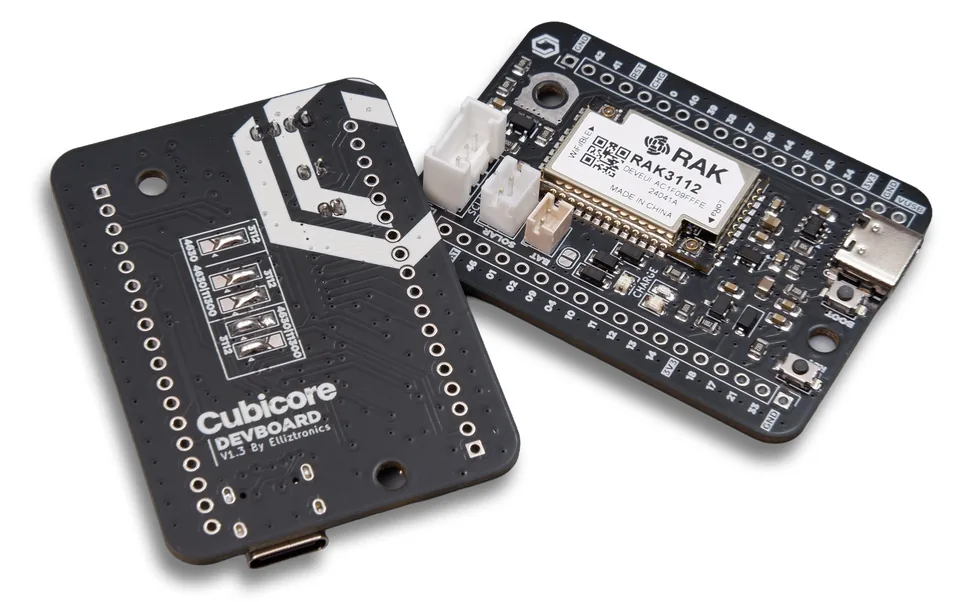
The Cubicore Devboard is a professional-grade development platform engineered to bridge the gap between initial concept and field-ready IoT deployment. It is designed to accelerate the prototyping phase for sophisticated IoT applications that require the concurrent use of LoRaWAN, Wi-Fi, and Bluetooth Low Energy (BLE), offering a unified hardware target for multi-protocol firmware development.
The board is built around an Espressif ESP32-S3 MCU paired with a Semtech SX1262 LoRa transceiver, integrated on a RAK3112 module. A USB-C interface provides power and the primary UART path for AT commands and firmware updates.
For step-by-step instructions, see the Cubicore Devboard guide series — building, flashing, connecting, and deploying with the Devboard.
Guide SeriesKey features
- Universal Connectivity — A USB-C interface provides a modern standard for system power and high-speed data transfer. This interface serves as the primary UART communication path for executing AT commands and performing firmware updates.
- Power Autonomy — An onboard Li-Po charging circuit (managed by the TP4054 IC) enables immediate testing of remote deployment scenarios, allowing the board to transition from bench power to battery without additional hardware.
- User Interface — Physical BOOT and RST (Reset) pushbuttons, alongside onboard status LEDs, provide tactile control and immediate visual feedback during the debugging and flashing processes.
- Expandability — Dedicated I2C header ports (including Grove-compatible connectors) allow for the plug-and-play integration of various sensors and peripherals, reducing wiring errors and assembly time.
User interface
The board provides physical controls and connectors for power, programming, and reset.
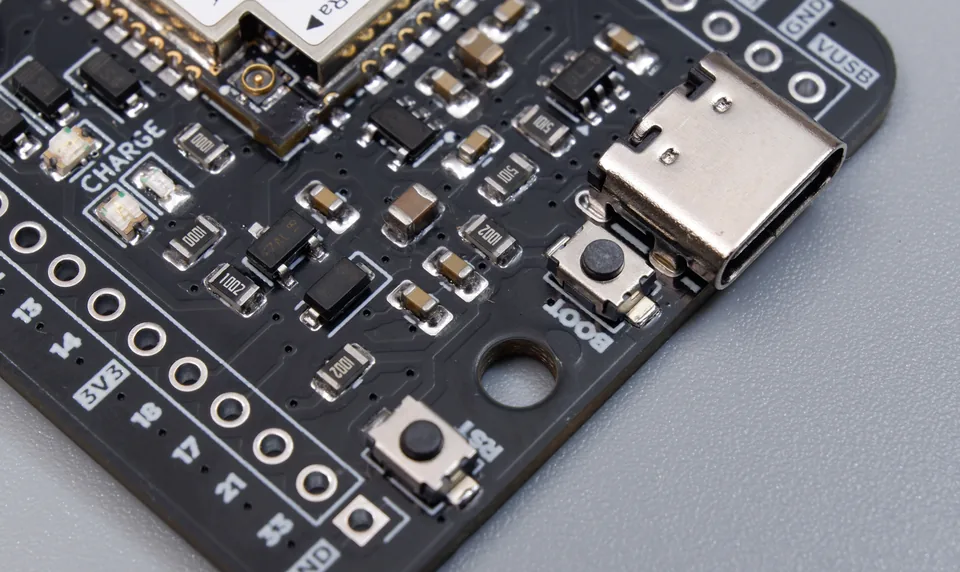
Figure: USB-C connector, BOOT button, and RST button on the Devboard.
| Interface | Function |
|---|---|
| USB-C | Provides 5V power and high-speed data transfer. Serves as the primary UART path for AT commands and firmware updates. |
| BOOT Button | Forces the ESP32-S3 into bootloader (flash) mode when held during power-up/reset. Used for firmware flashing. |
| RST Button | Resets the ESP32-S3 (system reset). |
To enter flash mode, hold the BOOT button while pressing RST (or while powering on), then release BOOT. This puts the ESP32-S3 into download mode for firmware updates.
In the standard factory pre-assembled configuration, the Devboard is mounted to its protective baseplate with an integrated Antenna Locker Plate. This plate features compliant 3D-printed flexible tabs embossed with R (Reset) and B (Boot), allowing direct finger actuation of the underlying SMD tactile switches while protecting the board and antenna connections.
LED indicators
The board provides onboard status LEDs for visual feedback during operation, debugging, and charging.
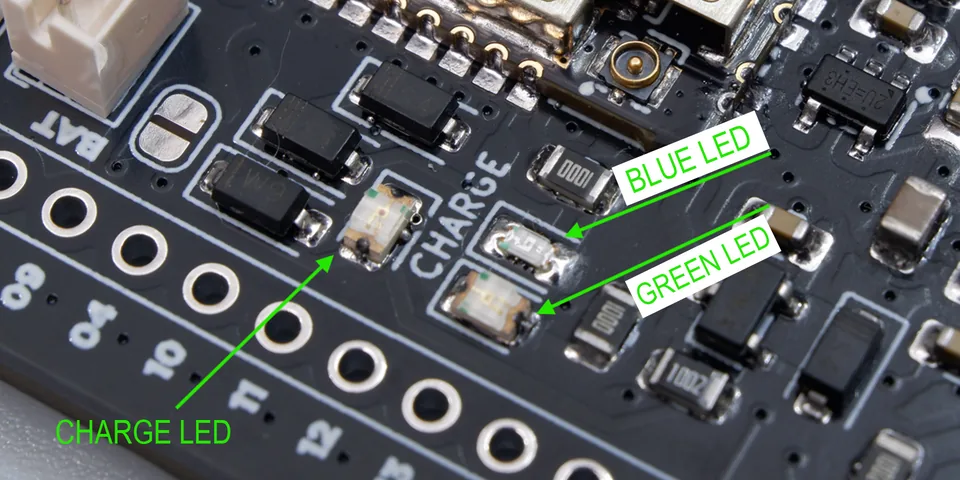
Figure: The three onboard LEDs — Blue (status), Green (status), and Charge LED.
| LED | Function | Notes |
|---|---|---|
| Blue LED | User-programmable status LED | Connected to GPIO45 (P23) |
| Green LED | User-programmable status LED | Connected to GPIO46 (P25) |
| Charge LED | Battery charging status | Red LED driven by the TP4054 CHRG pin |
The status LEDs (Blue/Green) are connected through solder jumpers that configure the board for the RAK3112 module. The factory default is set correctly. See the Module selector jumpers section.
The Charge LED indicates the TP4054 charging state — on while charging, off when full, and twinkling when no battery is connected. See the Charging status section for the full CHG status table.
Hardware architecture
The Cubicore Devboard employs a high-reliability power and protection tree designed for the rigors of an engineering environment. The design philosophy emphasizes clean power delivery and robust protection against the electrical transients common in laboratory and field testing.
Core system components
| Component | Function |
|---|---|
| Core Module | Espressif ESP32-S3 MCU with a Semtech SX1262 LoRa transceiver |
| Voltage Regulator | RT9080-33GJ5 LDO — maintains a stable +3.3V rail for both the ESP32-S3 and SX1262, ensuring consistent RF sensitivity and output power |
| Battery Charger | TP4054 IC — linear Li-Ion battery management for 3.7V/4.2V batteries |
| USB ESD Protection | USBLC6-2SC6 IC — protects sensitive USB data lines from electrostatic discharge (ESD) |
| Power Switching Logic | AO3407A MOSFET + MBR140SFT1G Schottky diodes — seamless power-path management, auto-switching between VBUS (USB) and Battery power |
Module-internal connections (ESP32-S3 and SX1262)
The following connections are made inside the RAK3112 module between the ESP32-S3 MCU and the Semtech SX1262 LoRa transceiver. These GPIOs are not exposed on the board headers — they are internal to the module and listed here for architectural reference only.
| SX1262 Pin | ESP32-S3 GPIO | Function |
|---|---|---|
| SPI_NSS | GPIO7 | SPI select |
| SPI_SCK | GPIO5 | SPI clock |
| SPI_MISO | GPIO3 | SPI Master in |
| SPI_MOSI | GPIO6 | SPI Master out |
| NRESET | GPIO8 | SX1262 reset |
| ANT_SW | GPIO4 | SX1262 RF switch power |
| DIO1 | GPIO47 | SX1262 DIO1 |
| BUSY | GPIO48 | SX1262 BUSY |
GPIO4 is shared between the internal SX1262 RF switch (ANT_SW) and the board header (P29). It is consumed internally and is not available for general-purpose use on the header.
Power architecture
The Devboard's power system is designed around a seamless power-path management topology. It accepts power from multiple sources (USB, solar, or battery) and automatically selects the best available source to feed the system rail, which is then regulated to +3.3V for the module and peripherals.
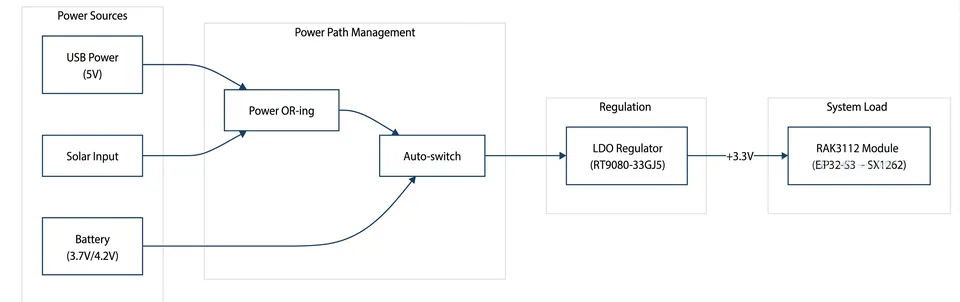
Figure: Power architecture — power sources, power path management, regulation, and system load.
Power path stages
| Stage | Block | Description |
|---|---|---|
| 1 | USB Power | USB-C input provides 5V (VBUS). |
| 2 | Solar Input | Optional solar panel input for remote/off-grid deployments. |
| 3 | Power OR-ing | Diodes combine USB and Solar into a single rail, preventing back-feed between sources. |
| 4 | Auto-switch | A P-MOSFET automatically selects between the OR-ed input and the battery. When USB/solar is present, the battery is disconnected; when absent, the battery takes over. |
| 5 | Battery | Li-Po backup supply (3.7V nominal / 4.2V max) that powers the board when USB/solar is unavailable. |
| 6 | LDO Regulator | The RT9080-33GJ5 LDO regulates the selected input down to a stable +3.3V rail. |
| 7 | RAK3112 Module | The main load — ESP32-S3 MCU + SX1262 LoRa transceiver, powered from the +3.3V rail. |
How the auto-switch works
The power-path logic (P-MOSFET + pull-down resistor) ensures uninterrupted operation during power transitions:
- USB/Solar present → the OR-ed rail is high → the MOSFET gate is pulled high → the P-MOSFET turns OFF → the battery is disconnected. The system is powered from USB/solar via the OR-ing diodes.
- USB/Solar absent → the OR-ed rail drops low → the pull-down resistor pulls the MOSFET gate to GND → the P-MOSFET turns ON → the battery feeds the system rail.
This means the board can transition from bench power (USB) to battery (or solar) without a reset or power interruption, which is essential for field deployments.
The battery is also charged by the TP4054 charger when USB/solar power is available, so the battery stays topped up for when it's needed. See the Battery management section for details.
Power input connectors
The board provides dedicated connectors for the battery and solar power inputs.
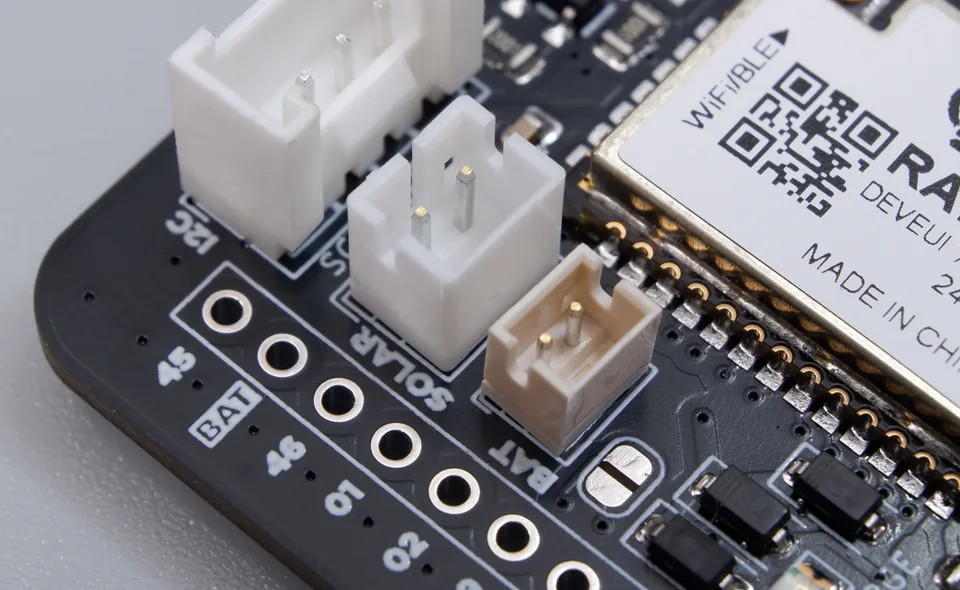
Figure: The I2C, SOLAR, and BAT connectors on the Devboard (all JST style).
| Connector | Signal | Description |
|---|---|---|
| BAT | +BATT / GND | Li-Po battery input (2-pin JST_ZH) |
| SOLAR | +SOL_IN / GND | Solar panel input (2-pin JST_PH) |
The BAT connector connects the Li-Po battery (3.7V nominal / 4.2V max) to the power path and TP4054 charger. The SOLAR connector accepts a solar panel input for off-grid deployments. The BAT uses a 2-pin JST_ZH connector and the SOLAR uses a 2-pin JST_PH connector.
A + icon is printed on the silkscreen beside each connector to indicate the positive (power-in) pin. Ensure the positive wire is connected to the pin marked with the + icon.
Data and control architecture
The following table summarizes the non-power connections between the module and the board's interfaces.
| Connection | From → To | Purpose |
|---|---|---|
| USB Data | USB-C → USBLC6-2SC6 → ESP32-S3 (USB_D+/D-) | ESD-protected data path for AT commands & firmware updates |
| LoRa | ESP32-S3 ↔ SX1262 (internal SPI) | LoRa transceiver control |
| Expansion | ESP32-S3 → J1/J2 Headers | 18-pin headers × 2 for GPIO/SPI/UART/analog |
| I2C | ESP32-S3 → Grove J6 (I2C) | Plug-and-play sensor bus |
| Control | ESP32-S3 → BOOT/RST buttons | Flash mode + reset |
| Status | ESP32-S3 → Status LEDs | Visual feedback |
Battery management
The Devboard uses a TP4054 linear Li-Ion charger to manage the battery. This section covers charging, battery compatibility, and thermal management.
Battery charging
The onboard TP4054 linear Li-Ion charger manages the battery. It charges the battery from the OR-ed rail (+V_USB-D) whenever USB or solar power is available.
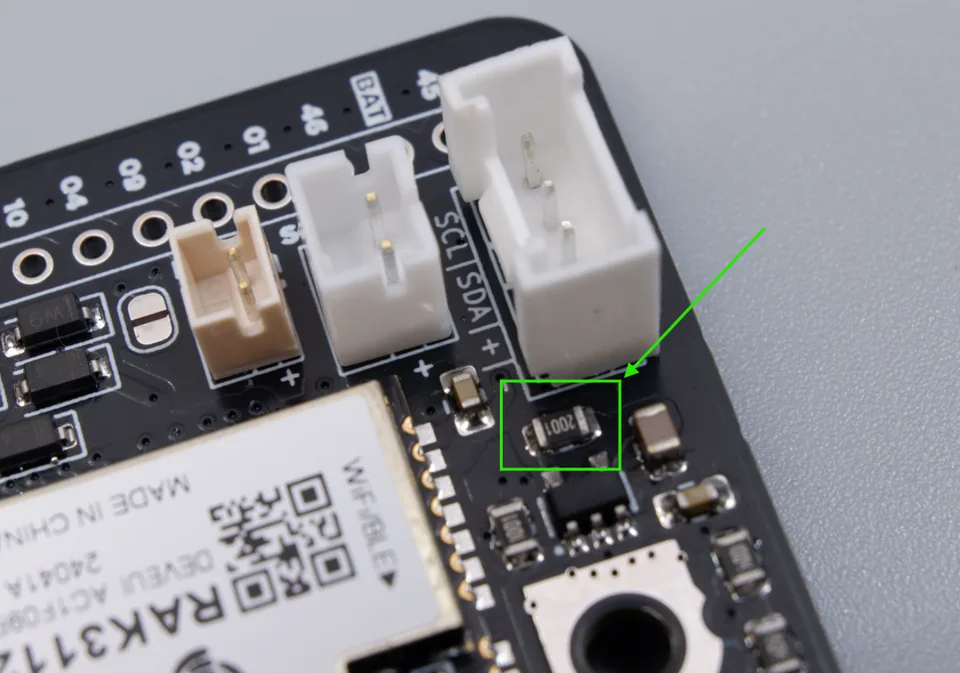
Figure: Charge-set resistor (R2) on the PROG pin, which sets the charge current.
| Parameter | Value |
|---|---|
| Charger IC | TP4054 (linear Li-Ion) |
| Charge Voltage | 4.2V (cutoff) |
| Charge Current | 500 mA (set by the charge-set resistor = 2K on PROG pin) |
| Charging Source | OR-ed rail (+V_USB-D) — USB or solar |
| Battery | 3.7V nominal / 4.2V max Li-Po |
The charge current is set by the charge-set resistor on the TP4054's PROG pin. The default value is 2K → 500 mA. To change the charge current, replace the resistor with a different value. The TP4054 charge current is approximately I_charge ≈ 1000 / R_PROG (R in kΩ), so a lower resistance increases the charge current and a higher resistance decreases it.
Battery compatibility
The TP4054 charger is designed for small IoT batteries. The table below summarizes the recommended battery sizes.
| Battery Size | Recommended? | Notes |
|---|---|---|
| Small (100–1000 mAh) | ✅ Recommended | Ideal for IoT deployments. A 500 mAh cell charges in ~1 hour at 500 mA. |
| Medium (1000–2000 mAh) | ⚠️ Acceptable | Longer charge time (~2–4 hours). Monitor temperature during charging. |
| Large (>2000 mAh) | ❌ Not recommended | Charge time becomes impractical (many hours), and linear charger heat dissipation is a concern. |
Large batteries are not recommended. The 500 mA charge current would take a very long time to charge a large capacity cell, and the linear charger's heat dissipation becomes impractical at higher charge currents. For large batteries, use a dedicated higher-current charger.
Thermal management
The TP4054 is a linear charger, which means it dissipates the excess voltage as heat. The higher the charge current, the more heat is generated. The board is designed with 500 mA as the recommended charge current — this balances charging speed against heat dissipation.
The heat generated during charging is roughly:
$$P_{diss} = (V_{in} - V_{bat}) \times I_{charge}$$
For example, charging a 3.7V battery from a 5V source at 500 mA:
$$P_{diss} = (5V - 3.7V) \times 0.5A = 0.65W$$
To manage this heat, the board is designed to use the screw hole beside the TP4054 IC as a heatsink. The copper pour and mounting hardware around the charger help conduct and dissipate the heat away from the IC, preventing overheating during extended charging.
The TP4054 also features an internal thermal feedback loop that reduces the charge current if the die temperature exceeds ~120°C, protecting the charger from overheating. This works in conjunction with the board's heatsink design to keep the charger within safe operating limits.
Charging status
The TP4054's CHRG pin is open-drain, active-low. It drives the red Charge LED and is also exposed as the CHG signal for firmware monitoring.
| Charging State | CHG Pin | Charge LED |
|---|---|---|
| Normal charging | Pulled low | On |
| Battery full | High-impedance | Off |
| Battery reverse / under-voltage | High-impedance | Off |
| No battery connected | Pulses | Twinkles |
Pin definition and ESP32-S3 functionality
The Cubicore Devboard utilizes a strategic mapping logic to expose the internal capabilities of the main module. The board labels reflect the internal GPIO numbers of the ESP32-S3 MCU.
Pin mapping table
The board exposes pins via the RAK3112 module footprint. The P-labels below are the RAK3112 module pin numbers (verified against the official RAK3112 datasheet). Each maps to its Board Label (the ESP32-S3 GPIO pin name) and primary/special function.
| RAK3112 Pin | Board Label | Primary/Special Function |
|---|---|---|
| P23 | GPIO45 | General I/O |
| P25 | GPIO46 | General I/O |
| P26 | GPIO1 | General I/O |
| P27 | GPIO2 | General I/O |
| P28 | GPIO9 | I2C1_SDA |
| P29 | GPIO4 | RF Switch Power |
| P30 | GPIO10 | SPI_MISO |
| P31 | GPIO11 | SPI_MOSI |
| P32 | GPIO12 | SPI_CS |
| P33 | GPIO13 | SPI_SCK |
| P34 | GPIO14 | Analog In (AIN1) |
| P39 | GPIO18 | I2C2_SCL |
| P40 | GPIO17 | I2C2_SDA |
| P41 | GPIO21 | Analog In (AIN0) |
| P4 | GPIO33 | NC (Internal SPI Flash) |
| P19 | GPIO42 | General I/O |
| P18 | GPIO41 | General I/O |
| P17 | RST | RESET (System Reset) |
| P24 | GPIO0 | BOOT (Flash Mode) |
| P13 | GPIO40 | I2C1_SCL |
| P12 | GPIO39 | General I/O |
| P11 | GPIO38 | General I/O |
| P10 | GPIO37 | NC (Internal SPI Flash) |
| P9 | GPIO36 | NC (Internal SPI Flash) |
| P8 | GPIO35 | NC (Internal SPI Flash) |
| P7 | GPIO43 | UART_TX (UART0) |
| P6 | GPIO44 | UART_RX (UART0) |
| P5 | GPIO34 | NC (Internal SPI Flash) |
| TP4054 CIO Pin | CHG | Chg io pin TP4054 |
| BAT | BAT | +BATT (Battery Input) |
| 3v3 | 3V3 | +3.3V System Rail |
| VBUS | — | +5V USB Power |
| GND | — | Ground |
Pin table notes
- RF_LoRa / RF_WiFi: These pins are only available and active on the NO-IPEX connector variant of the main module.
- GPIO4: This pin is consumed internally for RF switch power and is not available for general-purpose use.
- NC Pins (GPIO33–GPIO37): These pins are unavailable for external connection on variants equipped with 16MB Flash, as they are dedicated to the internal high-speed SPI interface.
- UART0: These are the default pins for the ESP32-S3 UART0. Note that hardware silk/schematic labels may list GPIO43 as "UART1_TX," though it functions as the standard transmit line for UART0.
Physical header layout
The board exposes two 18-pin headers (J1 and J2). The image below shows the physical pin order as seen on the board.
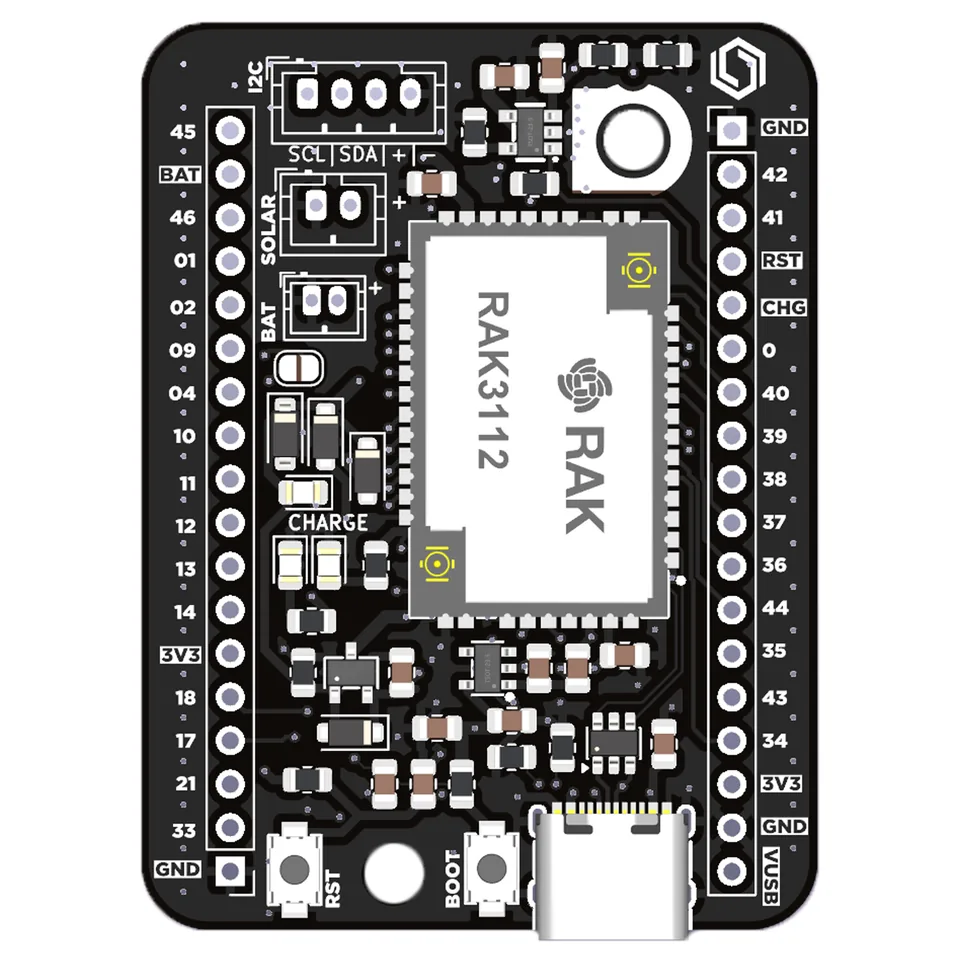
Figure: Devboard top view showing the two 18-pin headers, RAK3112 module, I2C/SOLAR/BAT connectors, RST/BOOT buttons, and USB-C.
Pin numbers shown are the board header positions (1–18). The labels are the board silk labels (ESP32-S3 GPIO names). See the Pin mapping table for the full function mapping.
Module selector jumpers
There are selector jumpers on the back of the module used to set the module pins to their correct positions. These jumpers configure the board for the RAK3112 module.
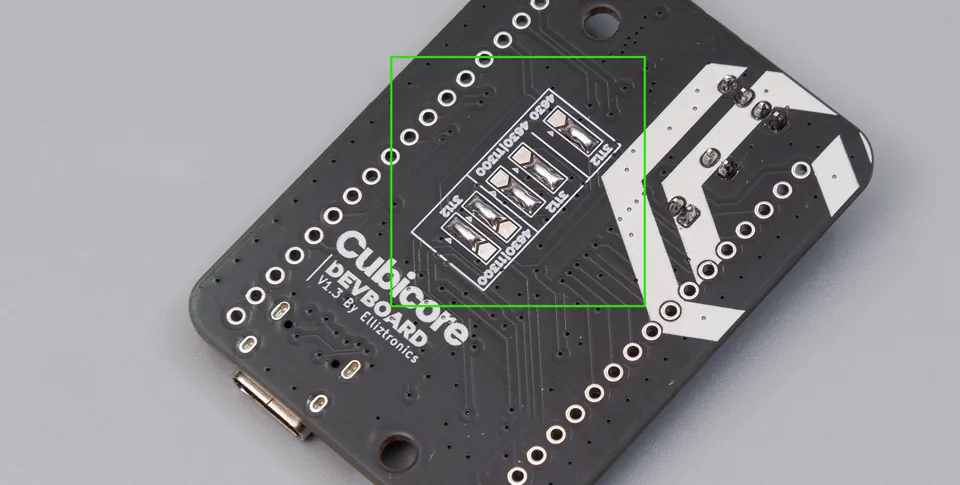
Figure: Module selector jumpers on the back of the board (JP8 for I2C-SDA, JP4 for I2C-SCL).
The current factory default settings point to RAK3112 and should not be changed unless necessary. The factory default already points to the correct module. If the jumpers are broken or desoldered, refer to the image above to restore the correct settings.
I2C interface
The Devboard provides I2C connectivity for plug-and-play sensors and peripherals. It exposes two I2C buses and a dedicated Grove-compatible connector.
I2C pins
| I2C Bus | Signal | RAK3112 Pin | GPIO |
|---|---|---|---|
| I2C1 | SDA | P28 | GPIO9 |
| I2C1 | SCL | P13 | GPIO40 |
| I2C2 | SCL | P39 | GPIO18 |
| I2C2 | SDA | P40 | GPIO17 |
I2C header (Grove / JST)
The board provides a dedicated I2C header (Grove-compatible) for connecting sensors and peripherals. The connector uses a JST style connector and is wired to I2C1.
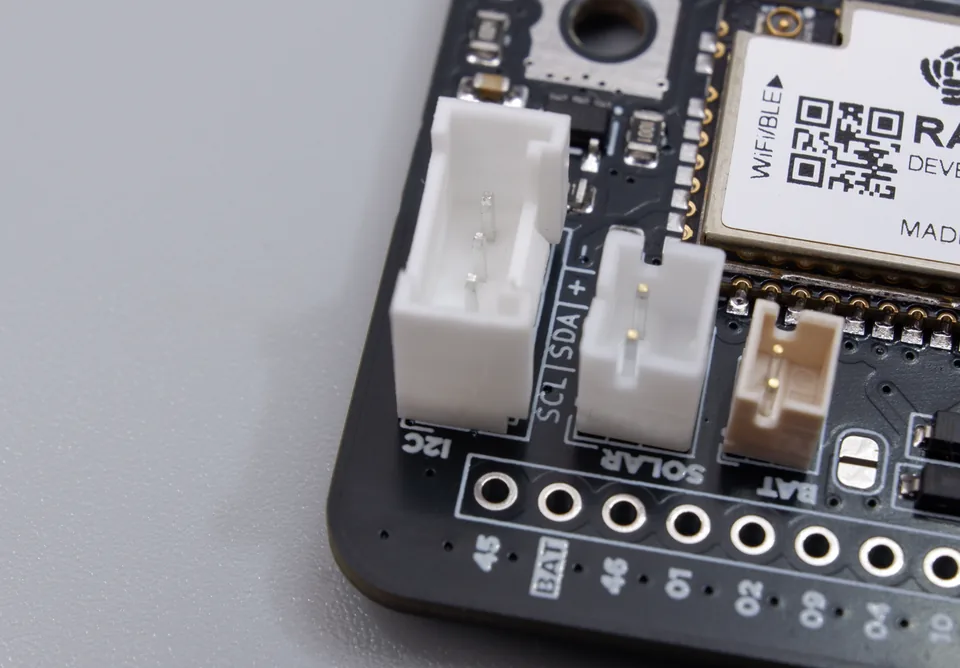
Figure: The I2C connector (JST) on the Devboard, labeled SCL/SDA/+/-.
| Pin | Signal | RAK3112 Pin | GPIO | Description |
|---|---|---|---|---|
| 1 | SCL | P13 | GPIO40 | I2C clock |
| 2 | SDA | P28 | GPIO9 | I2C data |
| 3 | +3.3V | — | — | Power supply |
| 4 | GND | — | — | Ground |
The I2C header is 100% Grove-compatible, allowing plug-and-play connection of Grove sensors and peripherals. The connector uses a JST style connector and is wired to I2C1 (SDA = P28, SCL = P13). See the Physical header layout section for the connector location.
Electrical characteristics and operating constraints
Adhering to these constraints is paramount for module longevity. Operating outside these limits may result in permanent hardware failure or degraded RF performance.
Operating limits and requirements
| Parameter | Value | Source/Interface |
|---|---|---|
| VBUS Input Voltage | 5.0V | USB-C Interface |
| Battery Input Voltage | 3.7V Nominal / 4.2V Max | Li-Po Connector |
| System Operating Voltage | 3.0V – 3.6V (+3.3V Typ.) | Onboard LDO Output |
| Operating Temperature | -40°C to 65°C | Ambient Environment |
Current consumption
The values below are module reference values measured on the RAK3112 module at 3.3V / 25°C (per the official RAK3112 datasheet). They do not include the Devboard's own power tree overhead. Board-level current draw will be higher due to the RT9080 LDO quiescent current and efficiency loss, the TP4054 charger quiescent current, power-path diode/MOSFET losses, status LEDs, and pull-up resistors. The LDO/charger overhead is most significant at low-power (sleep) states.
Operating current (peak) — module reference
| Work Mode | Condition | Peak Current |
|---|---|---|
| Wi-Fi TX | 802.11b, 1 Mbps, @21 dBm | 340 mA |
| Wi-Fi TX | 802.11g, 54 Mbps, @19 dBm | 291 mA |
| Wi-Fi TX | 802.11n, HT20, MCS7, @18.5 dBm | 283 mA |
| Wi-Fi TX | 802.11n, HT40, MCS7, @18 dBm | 286 mA |
| Wi-Fi RX | 802.11b/g/n, HT20 | 88 mA |
| Wi-Fi RX | 802.11n, HT40 | 91 mA |
| LoRa TX | +22 dBm @ 868–915 MHz | 140 mA |
| LoRa TX | +20 dBm @ 868–915 MHz | 127.5 mA |
| LoRa TX | +17 dBm @ 868–915 MHz | 118 mA |
| LoRa TX | +14 dBm @ 868–915 MHz | 112 mA |
| LoRa RX | LoRa 125 kHz | 25.46 mA |
Sleep current — module reference
| Feature | Condition | Max Current |
|---|---|---|
| Light-sleep | VDD_SPI and Wi-Fi powered down, all GPIOs high-impedance | 241 µA |
| Deep-sleep 1 | RTC memory and RTC peripherals powered up | 9 µA |
| Deep-sleep 2 | RTC memory powered up, RTC peripherals powered down | 8 µA |
| Power off | CHIP_PU set low, chip shut down | 2 µA |
At deep-sleep, the RAK3112 module draws ~9 µA, but the Devboard's RT9080 LDO quiescent current, TP4054 charger, and power-path leakage will typically raise the actual board deep-sleep current above this figure. Measure the assembled board for accurate low-power budgeting.
RF / Antenna
Antenna configuration
The Devboard uses the RAK3112 module with MHF4 (IPEX) connectors for both LoRa and Wi-Fi/BLE antennas.
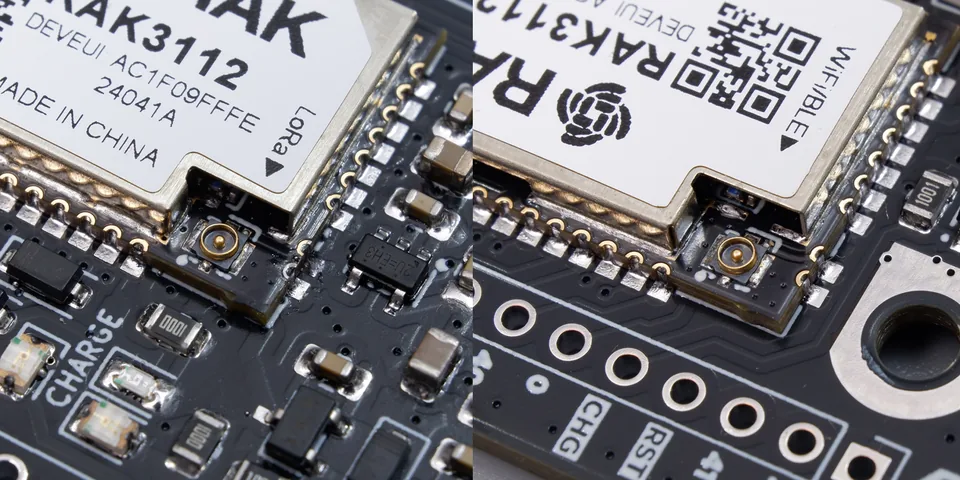
Figure: The two MHF4 (IPEX) connectors on the RAK3112 module — LoRa (left) and Wi-Fi/BLE (right).
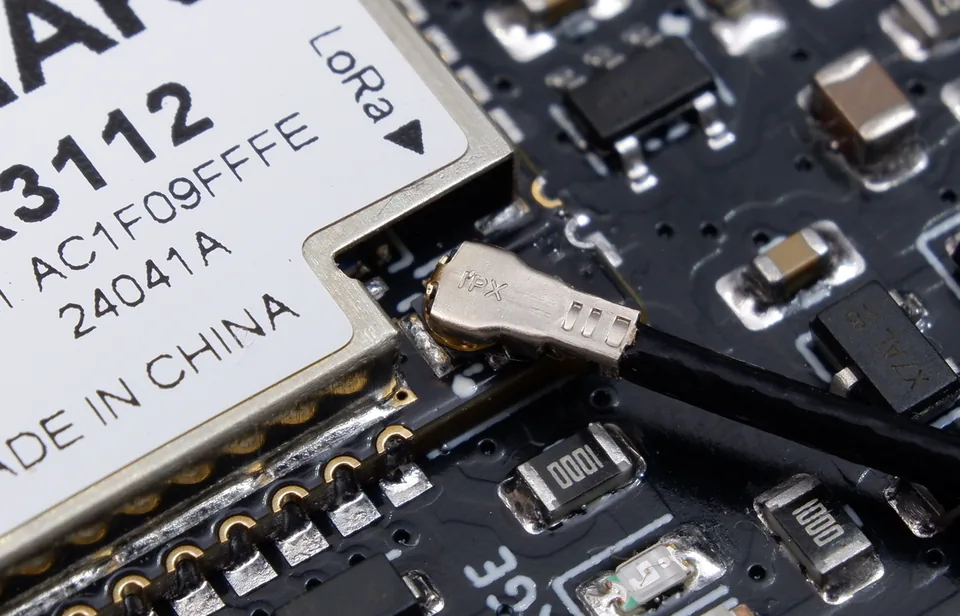
Figure: An MHF4 (IPEX) antenna cable connected to the LoRa connector on the RAK3112 module.
| Antenna | Connector | Notes |
|---|---|---|
| LoRa | MHF4 (IPEX) | External LoRa antenna via MHF4 connector |
| Wi-Fi / BLE | MHF4 (IPEX) | External Wi-Fi/BLE antenna via MHF4 connector |
The RAK3112 module provides two separate MHF4 (IPEX) connectors — one for the LoRa antenna and one for the Wi-Fi/BLE antenna. Each connector is clearly labeled on the module shield (LoRa / Wi-Fi-BLE). Connect the appropriate external antenna to each connector for the corresponding radio.
Because this is the MHF4 (IPEX) connector variant, the RF_LoRa and RF_WiFi pins are not exposed on the board headers. These RF pins are only available on the NO-IPEX connector variant of the RAK3112 module. See the Pin table notes section.
RF characteristics (module reference)
The following RF characteristics are from the RAK3112 module datasheet (module reference values).
LoRa transceiver
| Parameter | Value |
|---|---|
| Frequency Support | 863 – 928 MHz |
| TX Power | Programmable up to +22 dBm |
| RX Sensitivity (LoRa, BW=125kHz, SF=7) | -124 dBm |
| RX Sensitivity (LoRa, BW=250kHz, SF=7) | -121 dBm |
| RX Sensitivity (LoRa, BW=125kHz, SF=12) | -137 dBm |
| RX Sensitivity (LoRa, BW=250kHz, SF=12) | -134 dBm |
Wi-Fi
| Parameter | Value |
|---|---|
| Operating Frequency | 2412 – 2484 MHz |
| TX Power (802.11b, 1 Mbps) | 21.0 dBm |
| TX Power (802.11g, 6 Mbps) | 20.5 dBm |
| TX Power (802.11n, HT20, MCS0) | 19.5 dBm |
| RX Sensitivity (802.11b, 1 Mbps) | -98.4 dBm |
| RX Sensitivity (802.11g, 6 Mbps) | -93.2 dBm |
Bluetooth (BLE)
| Parameter | Value |
|---|---|
| Operating Frequency | 2402 – 2480 MHz |
| TX Power | Programmable from -24 dBm to +20 dBm |
| RX Sensitivity (BLE @1 Mbps) | -97.5 dBm |
| RX Sensitivity (BLE @125 Kbps) | -104.5 dBm |
Supported LoRaWAN bands
| Region | Frequency |
|---|---|
| Europe | EU868 |
| North America | US915 |
| Australia | AU915 |
| Korea | KR920 |
| Asia | AS923-1/2/3/4 |
| India | IN865 |
| Russia | RU864 |
Mechanical / Dimensions
The Devboard is a compact rectangular board. The mechanical drawing below shows the board outline, dimensions, and component placement.
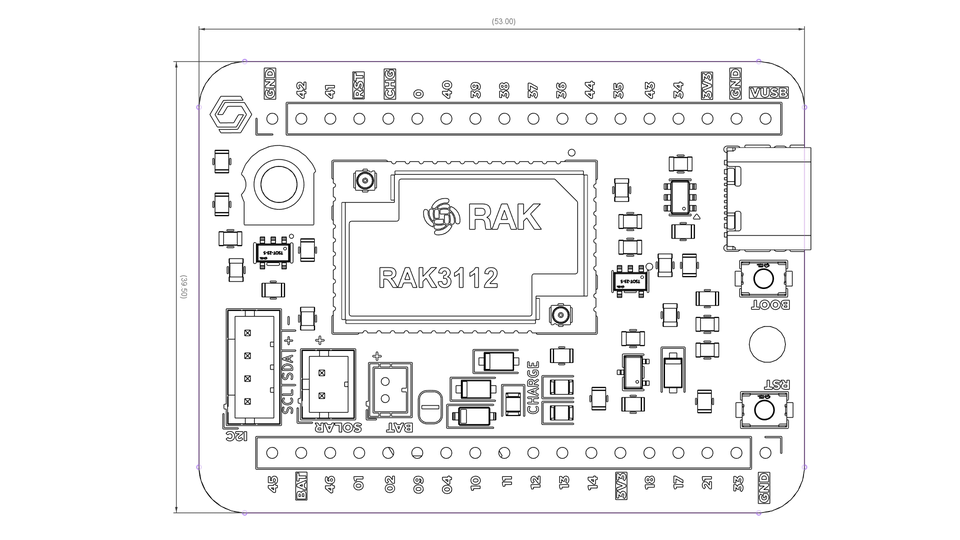
Figure: Devboard mechanical drawing — board outline, dimensions, and component placement.
Board dimensions
| Parameter | Value |
|---|---|
| Board Size | 59.00 mm × 39.50 mm |
| Shape | Rectangular |
| Mounting | M3 mounting holes for secure fastening |
Mounting holes
The board features M3 mounting holes for secure fastening to enclosures or mounting surfaces.
| Parameter | Value |
|---|---|
| Thread Size | M3 (3.0 mm metric) |
| Recommended Screw | M3 machine screw |
| Recommended Washer | M3 washer (optional) |
| Recommended Torque | ~0.5 N·m (hand-tight) |
Use M3 machine screws (not self-tapping) with a flat or pan head. Avoid over-tightening, as excessive torque can crack the PCB. A washer is recommended to distribute the load and prevent damage to the board surface.
To request CAD files (e.g., 3D models, footprint, or mechanical drawings) for the Devboard, please email support@cubicore.io.
The mechanical drawing also shows the full component layout, including the RAK3112 module, both 18-pin headers, I2C/SOLAR/BAT connectors, CHARGE area, RST/BOOT buttons, and USB-C connector.
Software / Development
Arduino support
The Devboard is fully supported in Arduino using the RAK3112 board definition or the ESP32-S3 board definition. This allows you to develop firmware for the board using the familiar Arduino ecosystem.
| Option | Board Definition | Notes |
|---|---|---|
| RAK3112 | RAKwireless RAK3112 | Uses the RAK3112 board package with LoRaWAN support |
| ESP32-S3 | Espressif ESP32-S3 | Uses the standard ESP32-S3 board package |
When using the ESP32-S3 board definition, the LoRa transceiver (SX1262) is controlled via the internal SPI pins. See the Module-internal connections section for the internal pinout.
RAK3112 internal pinout (LoRa chip)
The RAK3112 module connects the ESP32-S3 MCU to the Semtech SX1262 LoRa transceiver via an internal SPI interface. These pins are internal to the module and are used by the LoRa library to communicate with the SX1262. See the Module-internal connections section for the full pinout table.
These GPIOs are not exposed on the board headers — they are internal to the RAK3112 module. The LoRa library handles these connections automatically when using the RAK3112 board definition.
Upcoming board support
Future Arduino BSP support for a direct "Cubicore Devboard" board definition is coming soon and is under development. This will provide a dedicated board package for the Devboard, simplifying setup and configuration.
Related guides
- Getting Started with the Cubicore Devboard
- Flashing Firmware (Arduino IDE)
- Peripherals and I2C
- Wi-Fi and BLE
- Joining a LoRaWAN Network
- Integrating with Cubicore Cloud
- PlatformIO with Visual Studio Code
For support, email support@cubicore.io.
When contacting support, include:
- Devboard serial number or batch code
- DevEUI, if applicable
- Description of the issue
- Screenshot of the error or serial console logs with sensitive keys hidden